





As teams grow and orders increase, operational complexity becomes inevitable. It is in this context that automation at Freshworks becomes relevant. Not as a technical extra, but as a structural element to maintain efficiency.
When well thought out, these automations are not limited to a single product. On the contrary, they work in an integrated way between customer support, IT, sales or internal operations, reducing friction between teams and eliminating repetitive tasks.
What is meant by automation in Freshworks
In Freshworks systems, automation can exist at various levels and across multiple products. What makes it transversal is the fact that it impacts more than one team or process, even when configured in a single module.
For example, a rule created in Freshdesk can influence internal IT processes in Freshservice, or data automation can improve reports used by different departments. The value lies less in the rule itself and more in the chain reaction it creates.
Order entry and screening: where it all begins
One of the areas where cross-functional automation makes the biggest difference is right at the order entry point. Emails, forms, portals, or external integrations can generate tickets with different levels of quality and context.
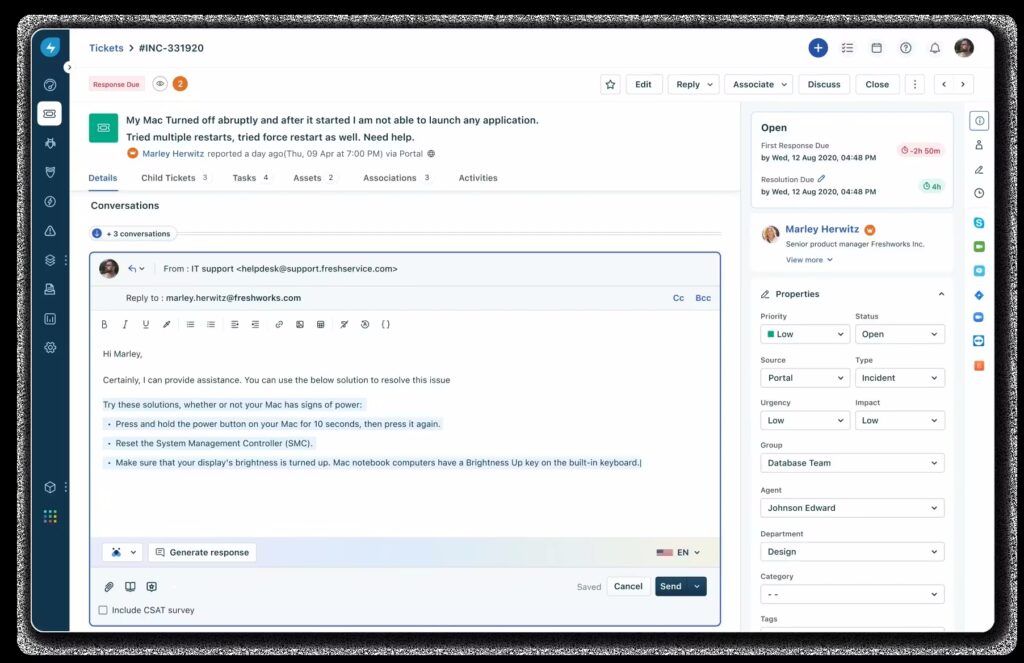
By automating initial classification—whether by subject, request type, or origin—Freshworks allows tickets to come in already organized. This reduces the time spent on manual sorting and improves the experience for both the requester and the responder.
This initial organization is later reflected in more reliable reports, better-defined priorities, and more predictable workflows.
Automatic assignment between teams and departments
Distributing work equitably is a constant challenge. Automated assignments help avoid bottlenecks and reliance on manual decisions.
In Freshworks programs such as Freshdesk Helpdesk and Freshservice ITSM, these rules can consider multiple criteria, such as request type, time, responsible group, or workload. The impact is not only operational: teams become more reliant on the system and less on ad hoc interventions.
When properly configured, this automatic assignment improves response times and reduces internal frustration, especially in environments with multiple teams involved.
Dynamic prioritization based on context
Not all requests have the same impact, and this difference isn't always obvious at first glance. Automations that adjust priorities based on clear criteria help maintain focus on what really matters.
In practice, this means that critical tickets don't get lost among routine requests. At the same time, it prevents inflating priorities without criteria, something common when everything is treated as urgent.
This type of automation improves daily decision-making and creates a more consistent workflow across teams.
SLAs and automated alerts as a safety net in Freshworks
SLAs become truly useful when linked to automation. Automatic alerts, escalations, and notifications allow action to be taken before a problem becomes visible to the end user.
In Freshworks programs, these automations function as an operational safety net. They don't replace the team's work, but they ensure that deadlines are not missed and that deviations are quickly identified.
Over time, this contributes to a more predictable service and better management of expectations.
More fluid internal communication
One of the less obvious advantages of cross-functional automation is improved internal communication. Automatic notifications, status updates, and internal comments help keep everyone aligned without the need for parallel messages.
When information flows within the platform, it reduces reliance on emails or unnecessary meetings. This saves time and decreases the risk of lost information.
Automations in Freshworks: Standardization of responses and actions
Automation also helps ensure consistency. Automatic responses and response templates, for example, ensure that users receive clear information that aligns with company practices.
This standardization is especially important in large or distributed teams, where different agents may interpret processes differently. Freshworks allows you to create this common ground without making customer service impersonal.
Cleaner data and more useful reports
When repetitive tasks are automated, data becomes more reliable. Accurate states, consistent priorities, and well-assigned categories result in reports that reflect reality, which has a direct impact on management. Decisions are then made based on consistent data, not on perceptions or exceptions.
Automating with discernment: less is more
Despite its potential, automating everything isn't always the best option. Excessive automation in Freshworks can create rigidity and hinder legitimate exceptions.
Freshworks allows you to start with simple rules and evolve gradually. This controlled growth helps maintain flexibility and ensures that automations continue to serve the business, and not the other way around.
Automations at Freshworks connect teams and projects
Cross-functional automation in Freshworks makes a bigger difference when it's considered as part of a system, not as isolated rules. By linking order entry, assignment, priorities, and SLAs, the platform helps create clearer and more efficient processes.
In addition to making tasks faster, these automations contribute to a more consistent, collaborative operation that is prepared for growth, maintaining control even as complexity increases.
To clarify any doubts or request a free demonstration, contact us using the form below.