




OKRs (Objectives and Key Results) help teams stay focused on clear and measurable goals. In ClickUp Collaboration, this method can be applied in a practical way, linking strategic goals to the daily work that takes place within the platform.
Unlike more theoretical approaches, OKRs in ClickUp are part of the normal workflow. Objectives, key results, and tasks coexist in the same space, which facilitates continuous monitoring and reduces reliance on external tools.
What are OKRs and why do they make sense in ClickUp?
An OKR consists of a qualitative objective and quantitative key results. The objective defines the direction, while the key results allow you to measure whether that direction is being followed.
The ClickUp framework adapts well to this methodology because it allows you to transform key results into concrete work. Each metric can be linked to real tasks, with assigned responsibilities, deadlines, and statuses. This helps avoid abstract and unactionable OKRs, which is a common problem in many teams.
Prepare the Clickup framework before creating OKRs
Before creating OKRs in ClickUp, it is important to define a clear structure within the hierarchy. Creating a space dedicated to OKRs helps separate strategic goals from daily operational work.
Within this space, folders or lists can represent time cycles, such as quarters, or areas of the company. This organization improves visibility and facilitates future analysis, especially when comparing results between different cycles or teams.
Creating OKRs in ClickUp step by step
Once the structure is defined, OKRs can be created in a simple way. Each objective should be recorded as a main task or project, with a clear and impact-oriented description.
Key results can be created as subtasks or custom fields. Each should have well-defined metrics, clear assignees, and realistic deadlines. This direct link between objective and execution makes monitoring more rigorous and reduces ambiguity.
Using views to track OKRs in Clickup
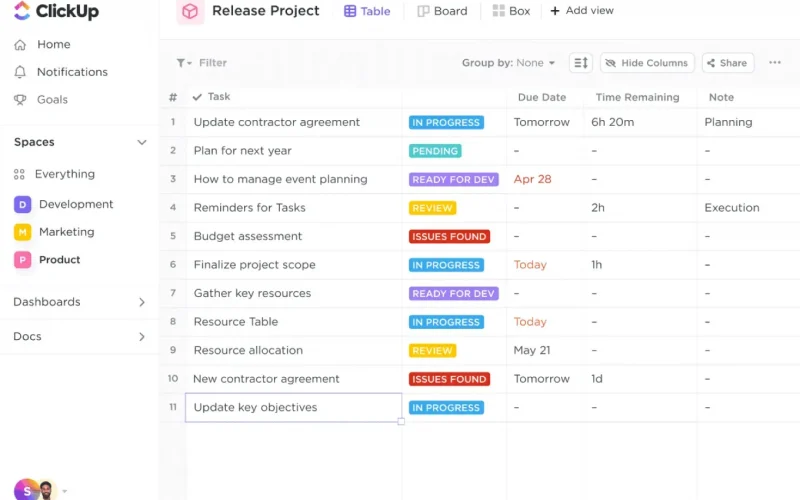
ㅤ Clickup views help track OKRs from different perspectives. The list view is useful for a quick overview of the overall status, while filters allow you to analyze progress by team or manager.
The Gantt view adds temporal context, showing deadlines and dependencies between key results. This is especially useful when OKRs depend on multiple teams or phased deliverables over time.
Dashboards for continuous monitoring
Dashboards allow you to track OKRs visually and centrally. This provides a clear view of progress without navigating through multiple lists or tasks.
A well-configured dashboard can serve as a basis for follow-up meetings, team alignments, or end-of-cycle reviews. By concentrating relevant information on a single panel, monitoring becomes faster and more consistent.
Custom states for OKRs in Clickup
Creating custom statuses helps translate OKR progress into simple language. Statuses like "In progress" or "At risk" make it easy to quickly understand the status of each objective.
These states should be used consistently by the team. When well-defined, they help identify problems early and act before deadlines or results are compromised.
Documentation and alignment with the team
ClickUp Docs allows you to record additional context about OKRs, such as evaluation criteria, strategic decisions, or alignment notes. This documentation is useful for ensuring that everyone interprets the objectives in the same way.
Keeping this information close to the tasks prevents loss of context and facilitates the integration of new team members during the OKR cycle.
Regular monitoring of OKRs in Clickup
The value of OKRs lies in continuous monitoring. Regular reviews help to understand if key results are progressing as expected or if priorities need to be adjusted.
In ClickUp, this monitoring can be done quickly through dashboards and filtered views. This practice reduces surprises at the end of the cycle and reinforces individual and collective responsibility.
Best practices for using OKRs in ClickUp
For OKRs to work well, it's important to keep them simple and focused. A small number of objectives per cycle helps the team concentrate its efforts on what really matters.
Key results should be measurable and linked to real work. Whenever possible, there should be clear accountability, ensuring consistent monitoring over time.
Clear and tracked OKRs in ClickUp
Creating and tracking OKRs in ClickUp involves structuring the workspace well, linking objectives to tasks, and using views and dashboards for continuous monitoring.
When applied in this way, OKRs cease to be just a strategic exercise and become part of the team's daily routine. ClickUp offers the necessary flexibility to adapt this model to different contexts, maintaining clarity and focus on results. To clarify any doubts and/or request your free demonstration, talk to us.