


ManageEngine ADManager Plus
With ADManager Plus, IT teams manage Active Directory and Microsoft 365 accounts, groups, computers, and permissions from a single console. Tasks that previously required scripting can now be done with just a few clicks, thanks to built-in automation, delegation, and reporting.
Identity management all in one tool
ADManager Plus covers hybrid Active Directory management, reporting, identity lifecycle, risk assessment, and workflow orchestration. The same dashboard can be used to create users, review access, and integrate enterprise applications. The team no longer has to switch between consoles and scripts and gains a coherent view of who has access to what.
ADManager Plus: Faster directory tasks and audit-ready information
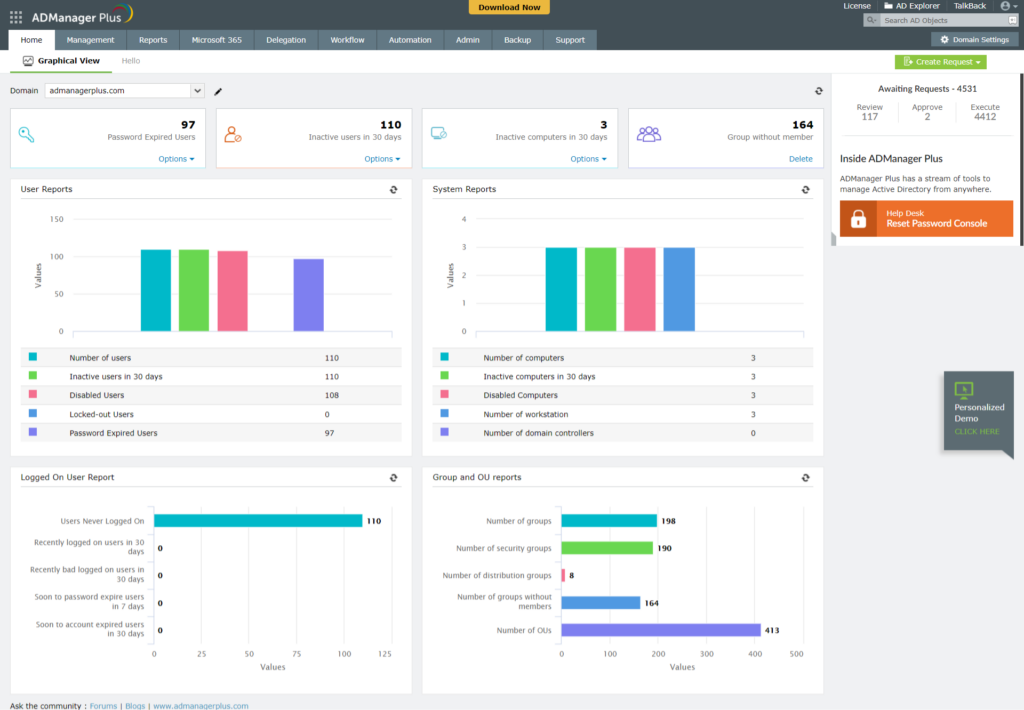
Over 200 predefined reports show the status of users, groups, GPOs, permissions, and licenses, and can be scheduled and exported in the desired formats. Logs of each action performed by technicians are available for internal and external audits.
Key features:
- Mass user management: Creating, modifying, activating, deactivating, and managing accounts using templates and CSV files, without writing a single line of PowerShell.
- Scriptless reports: Ready-made queries about recent logins, inactive accounts, password status, group members, and folder permissions.
- Delegation and approval workflows: helpdesk technicians perform AD tasks within defined limits, and requests go through requesters, reviewers, approvers, and executors.
An administration base that scales with the directory size
The solution serves organizations with a single domain and structures with multiple domains, organizational units, and technical teams. The offering is organized by editions and by additional modules, which are activated when the need arises.
- Hybrid environments: Active Directory, Microsoft 365, and Exchange management from a single console, with extension to Google Workspace.
- Integrations: with ManageEngine ecosystem – ServiceDesk Plus and Endpoint Central - and ecosystem Zoho, in addition to several others.
- Complementary modules: The Backup and Recovery add-on protects objects in Active Directory, Azure AD, and Google Workspace, while the Governance, Risk, and Compliance add-on adds risk assessment and access certification.
- Mobile applications: Active Directory administration tasks are also available outside of the desk.
Less repetitive work, more control over who does what.
ADManager Plus gives IT managers a structured way to distribute tasks, track requests, and keep the directory organized. Technicians work with more autonomy, and critical decisions remain under supervision.
Directory information at the click of a button
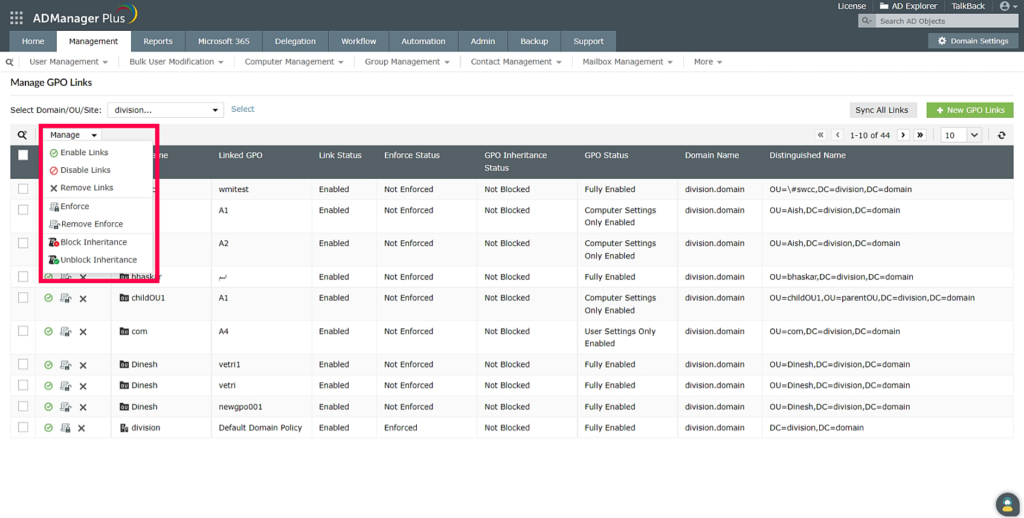
The dashboards and reports gather data on accounts, groups, computers, GPOs, and licenses. Administrators can quickly identify unused accounts, empty groups, passwords about to expire, and folders with locked inheritance.
Account lifecycles handled automatically
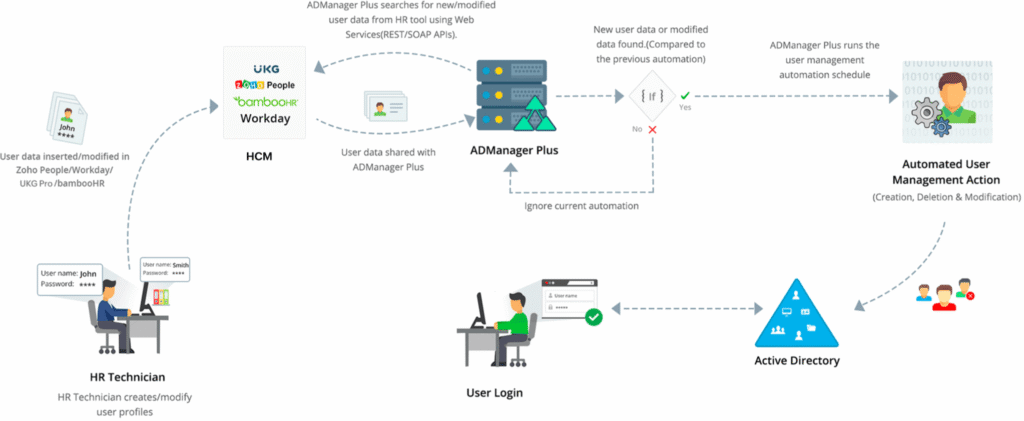
User creation in Active Directory, Microsoft 365, and other applications follows predefined rules. Cleaning up obsolete accounts, revoking inactive licenses, and automatically ending temporary group memberships keep the directory tidy.
Delegating tasks without losing control
The non-invasive delegation model allows technicians to perform actions in Active Directory without altering their directory permissions. Workflows with SLAs ensure that each request is approved and executed on time, with email or SMS notifications at each stage.
Automation for more secure identities
ADManager Plus orchestrates the end-to-end identity lifecycle. Automation rules create accounts, assign licenses, adjust group memberships, and terminate access when a person leaves the organization. Access certification campaigns require designated certifiers to periodically review access in AD and Microsoft 365, approving or revoking each one, preventing the accumulation of permissions over time. Identity risk assessment analyzes environmental indicators and returns a score summarizing the level of exposure. Attack path analysis shows how an intruder could progress laterally through the directory and allows for cutting those links before they are exploited.
Used by organizations in different sectors
Health
A healthcare organization implemented ManageEngine ADManager Plus to automate the user lifecycle in Active Directory and Microsoft 365. The platform simplified the creation and bulk removal of clinical practitioner accounts, ensured strict permission assignment to confidential medical files, and facilitated compliance with HIPAA audit and privacy requirements.
A public health entity adopted ADManager Plus to centralize identity and access management across multiple hospital domains. The solution enabled the delegation of password resets and group membership management to local support teams without granting elevated domain administrator privileges, reducing response time for users.
Banking and Financial Services
Financial institution that uses ManageEngine ADManager Plus to optimize user provisioning and ensure identity governance. With approval-based workflows (workflowsThe bank standardized the granting of access to critical systems and automated the generation of continuous audit reports for compliance with regulatory standards such as SOX and PCI-DSS.
A financial services company implemented ADManager Plus to securely manage its Active Directory and Microsoft 365 ecosystem. The solution eliminated the reliance on complex PowerShell scripts, enabling automated management of deactivated accounts, proactive cleanup of inactive objects, and granular delegation of Help Desk tasks.
Energy and Industry
A leading company in the construction and real estate industry adopted ADManager Plus to automate the creation, modification, and deactivation of employee and supplier accounts in Active Directory. Integration with customizable templates allowed for simultaneous provisioning of Exchange mailboxes, Microsoft 365 licenses, and file share permissions from a single console.
Toshiba's technology division uses ADManager Plus to simplify large-scale Active Directory administration. The platform has automated repetitive administrative tasks, optimized the management of security groups and NTFS permissions, and provided detailed reports on the Active Directory status for monitoring by the IT infrastructure team.
Education
The university adopted ManageEngine ADManager Plus to efficiently manage the high volume of student, faculty, and researcher logins and logouts. The tool automates the mass provisioning and deletion of thousands of accounts at the beginning and end of each academic year, automatically associating Microsoft 365/Teams licenses and group profiles by faculty.
The university uses ADManager Plus to securely decentralize Active Directory management across various academic departments. Through role-based Help Desk delegation (RBAC), the university enabled faculty staff to manage their own organizational units without exposing the central infrastructure to security risks.
Speak to a ManageEngine AdManager Plus specialist.
Priceless Consulting is a ManageEngine partner. Contact us to determine the edition and implementation model best suited to your organization.
ManageEngine has over 280,000 customers across 190 countries




FAQ
How does ADManager Plus improve the day-to-day work of IT teams?
Replaces separate scripts and consoles with guided actions, templates, and ready-made reports. Creating accounts, changing attributes, resetting passwords, and reviewing permissions no longer require PowerShell, saving time and reducing errors.
How does delegation work for helpdesk technicians?
Technicians perform AD tasks from the ADManager Plus console without their directory permissions being modified. It's possible to limit actions to organizational units or domains, create custom roles, and log everything each technician does.
What applications and services integrate with ADManager Plus?
In addition to Active Directory, the platform manages Microsoft 365 and Exchange, and automates user creation in Google Workspace and other enterprise applications through webhooks and orchestration templates. The Backup and Recovery add-on also covers Azure AD and Google Workspace.
How does it help meet compliance requirements?
Reports, workflows with request logs, and access certification campaigns provide evidence for audits associated with standards such as GDPR, PCI DSS, SOX, and HIPAA. The risk assessment adds a score that summarizes the directory's security posture.
What editions are available that I can try before deciding?
There are Standard and Professional editions, with the Professional edition adding group and organizational unit management, GPOs, file servers, workflows, automation with orchestration, and AD migration. The Free edition covers up to 100 domain objects, and there is a free trial version of the full platform. A Priceless Consulting specialist will accompany the pilot and help you choose the right edition.
What ManageEngine AdManager Plus customers are saying
Revolutionize the management of your services with Priceless Consulting and ManageEngine!

As ManageEngine partners, we offer customized implementation and dedicated support for companies worldwide. Benefit from expert consulting, dedicated training, and ongoing follow-up to maximize your return on investment.
Choose Priceless Consulting for efficient service management and seamless integration.